Introduction
heretek is a GDB TUI Dashboard inspired by gef, designed to seamlessly connect to remote targets even without a functioning gdbserver.
- No python requirements: Many vendors ship
gdbwithout python support. heretek ships a single statically-linked musl binary. - Architecture agnostic: heretek only uses information given by
gdb, no extra code required! - No gdbserver requirements: Many vendors ship invalid
gdbserverbinaries. heretek works on remote targets with justgdb,nc,cat, andmkfifo. No more wrestling with invalid or missinggdbserverbinaries.

“To every problem, a solution lies in the application of tech-lore” - Ferrarch Asklepian, Warhammer 40,000: Mechanicus
Installation
From crates.io
Build from published source:
$ cargo install heretek --locked
GitHub Releases
Download pre-built binaries from GitHub releases.
Arch Linux
Install from the official repositories:
$ pacman -S heretek
Usage
GDB TUI Dashboard for the understanding of vast knowledge

Usage: heretek [OPTIONS]

Options:
      --gdb-path <GDB_PATH>
          Override gdb executable path

  -r, --remote <REMOTE>
          Connect to nc session

          `mkfifo gdb_pipe; cat gdb_pipe | gdb --interpreter=mi | nc -l -p 12345 > gdb_pipe`

      --ptr-size <PTR_SIZE>
          Switch into 32-bit mode

          Heretek will do it's best to figure this out on it's own, but this
          will force the pointers to be evaluated as 32 bit

          [default: auto]
          [possible values: 32, 64, auto]

  -c, --cmds <CMDS>
          Execute GDB commands line-by-line from file

          lines starting with # are ignored

      --log-path <LOG_PATH>
          Path to write log

          Set env `RUST_LOG` to change log level

  -h, --help
          Print help (see a summary with '-h')

  -V, --version
          Print version
Local Session
Simply run heretek to start a local GDB session:
$ heretek
Remote Session
See Remote Targets for connecting to remote GDB sessions.
Command File
Use -c to execute GDB commands from a file on startup. Lines starting with # are ignored.
$ heretek -c my_commands.txt
Features
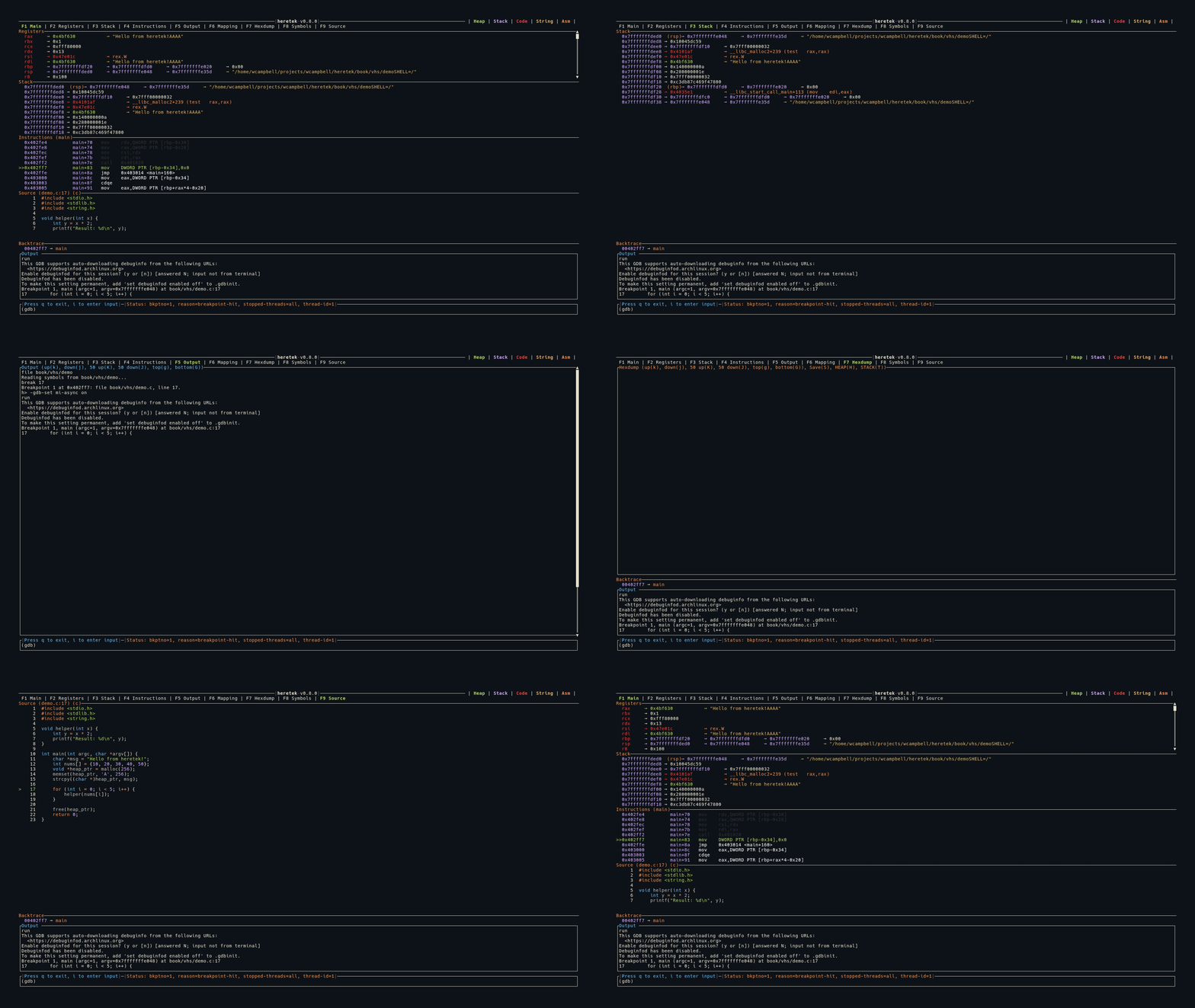
heretek provides a full-featured TUI dashboard for GDB. The interface is organized into tabs, each accessible via function keys:
| Key | Tab | Description |
|---|---|---|
| F1 | Main View | Combined view: Registers, Stack, Instructions, Source |
| F2 | Registers | Full-screen register display with dereference chains |
| F3 | Stack | Full-screen stack view |
| F4 | Instructions | Full-screen disassembly |
| F5 | Output | Scrollable GDB output log |
| F6 | Mapping | Memory mapping table with hexdump integration |
| F7 | Hexdump | Color-coded memory hexdump with register annotations |
| F8 | Symbols | Symbol browser with fuzzy search and disassembly |
| F9 | Source | Syntax-highlighted source code view |
Press Tab to cycle through views in order:
Color Coding
All values across every view are color coded by memory region:
- Green — Heap memory
- Purple — Stack memory
- Red — Code/text segment
- Yellow — ASCII strings
- Orange — Assembly instructions
See Color Coding for full details.
Pointer Dereference Chains
A key feature across Registers and Stack views is automatic pointer dereference. heretek follows pointer chains and displays them inline:
rax  0x7fffffffe000 → 0x00400580 → main+0 (push rbp)
rdi  0x7fffffffe1a8 → 0x7fffffffe3b0 → "/home/user/a.out"
- Numeric values are color-coded by which memory region they point to
- Function pointers show the symbol name and instruction
- C-strings are detected and displayed in yellow
- Circular pointer chains are detected and shown as
→ [loop detected]
Automatic Data Collection
Every time the program stops (breakpoint, step, signal), heretek automatically collects:
- Register names and values
- Changed registers (highlighted in red)
- Stack contents (14 entries from
$sp) - Disassembly around
$pc - Memory mappings
- Backtrace frames
- Source file and line number
- Pointer dereference chains for all registers
Main View (F1)
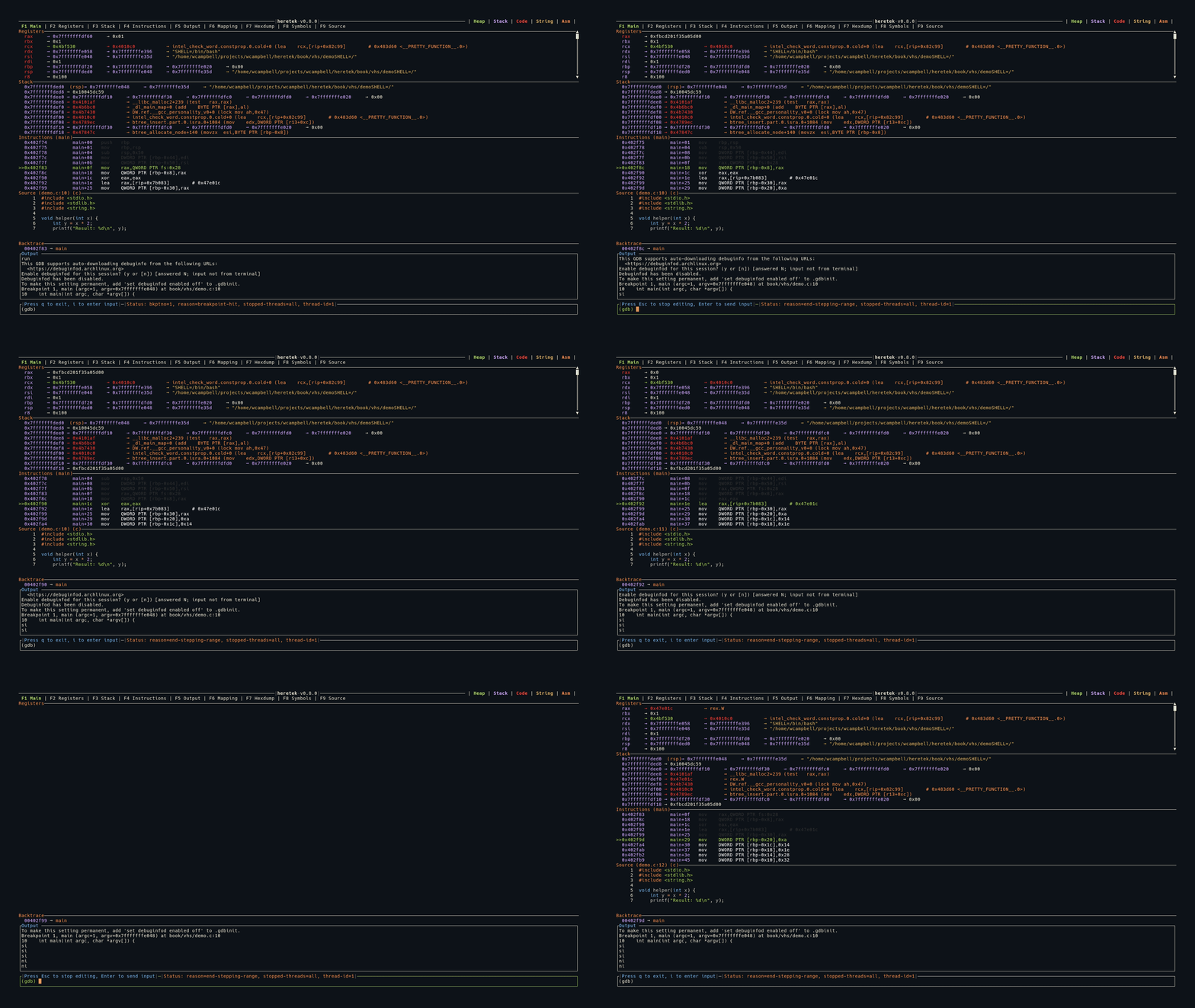
The main view is the default display, combining Registers, Stack, Instructions, and Source into a single screen.
Layout
All panels are stacked vertically. Registers takes as much space as needed (minimum 10 lines), while Stack and Instructions have fixed heights (11 lines each). Source fills remaining space when available.
When no program is loaded, the Registers panel displays the heretek ASCII art logo.
When source code is not available (e.g., stripped binary), the Source panel is hidden.
The Backtrace panel appears between the content area and the Output strip whenever backtrace frames are available.
Keybindings
| Key | Action |
|---|---|
j | Scroll registers down |
k | Scroll registers up |
J | Scroll registers down 50 lines |
K | Scroll registers up 50 lines |
See Keybindings for the full reference.
Backtrace
The backtrace panel is not a standalone tab — it appears automatically between the main content area and the output strip whenever backtrace data is available.
Display
Each frame in the call stack is shown as:
  0x00401238 → main
  0x7ffff7a2d840 → __libc_start_main
  0x00401060 → _start
- Addresses are shown in purple
- Function names are shown in orange
- Unknown functions display as
??
Behavior
- The backtrace is populated from
-stack-list-frames, which is queried automatically every time the program stops - The panel height adjusts to fit the number of frames
- When the program is running (no stop event), the backtrace panel disappears
Registers (F2)
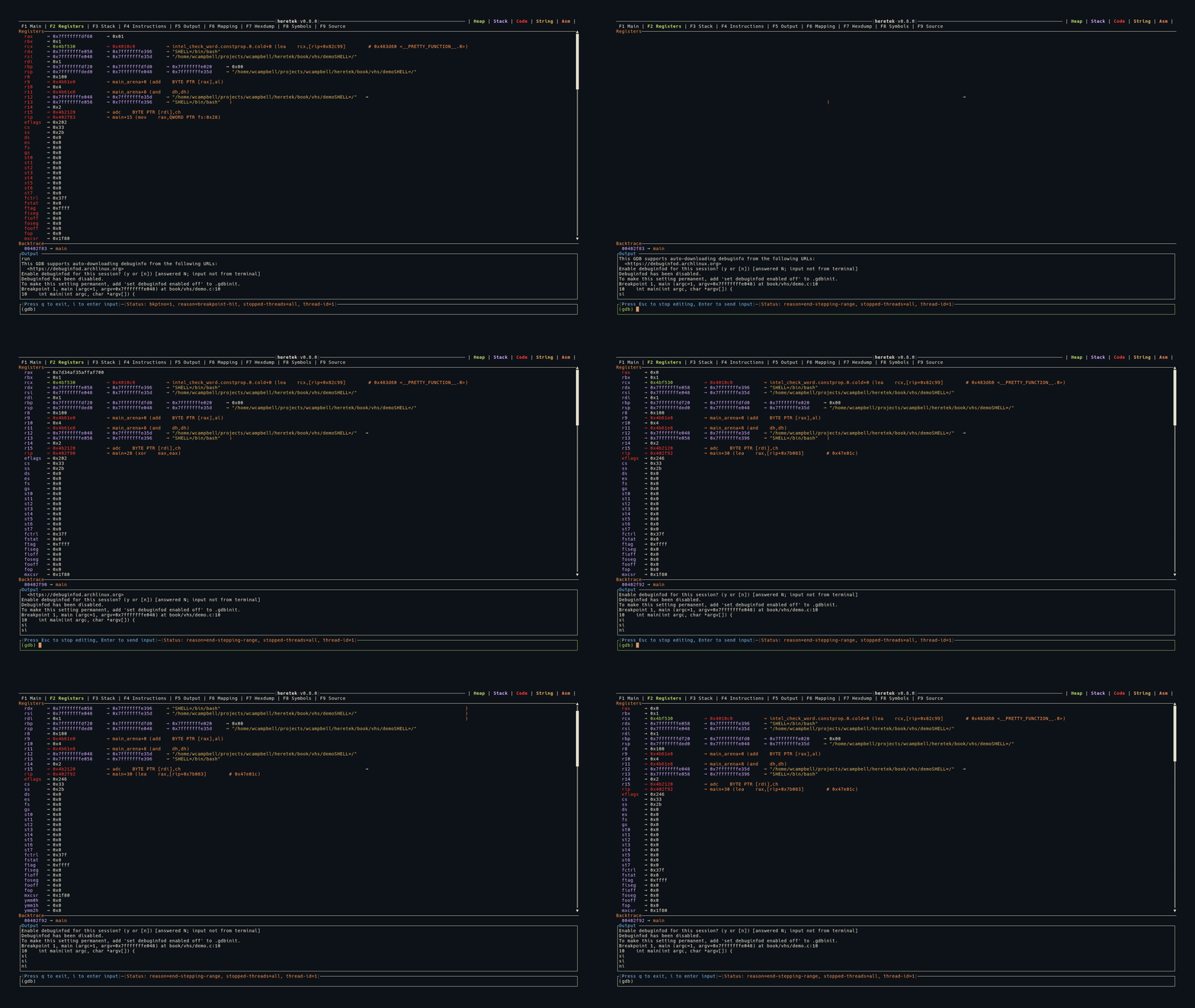
The Registers view shows a full-screen display of all CPU registers with their current values and dereference chains.
Display
Each register is shown as:
register_name 0xVALUE → dereferenced_value → ...
- Register names are left-padded for alignment
- Values are displayed in hexadecimal
- Values are color-coded by memory region (heap/stack/code)
- Changed registers are highlighted in red — registers whose values changed since the last stop
Dereference Chains
Each register value is automatically dereferenced to follow pointer chains:
rax  0x7fffffffe000 → 0x00400580 → main+0 (push rbp)
rdi  0x7fffffffe1a8 → 0x7fffffffe3b0 → "/home/user/a.out"
rsp  0x7fffffffdfe0 → 0x0000000000000001
The dereference engine:
- Follows pointers through memory, reading
ptr_sizebytes at each step - Detects ASCII strings and displays them in yellow
- Detects code pointers and shows the symbol + instruction in orange
- Detects pointer loops and stops with
→ [loop detected]in gray
32-bit vs 64-bit
- In 64-bit mode: values displayed as 19-character hex (e.g.,
0x00007fffffffe000) - In 32-bit mode: values displayed as 11-character hex (e.g.,
0xffffdfe0) - Pointer size affects dereference reads (4 vs 8 bytes per step)
Keybindings
| Key | Action |
|---|---|
j | Scroll down 1 line |
k | Scroll up 1 line |
J | Scroll down 50 lines |
K | Scroll up 50 lines |
Stack (F3)
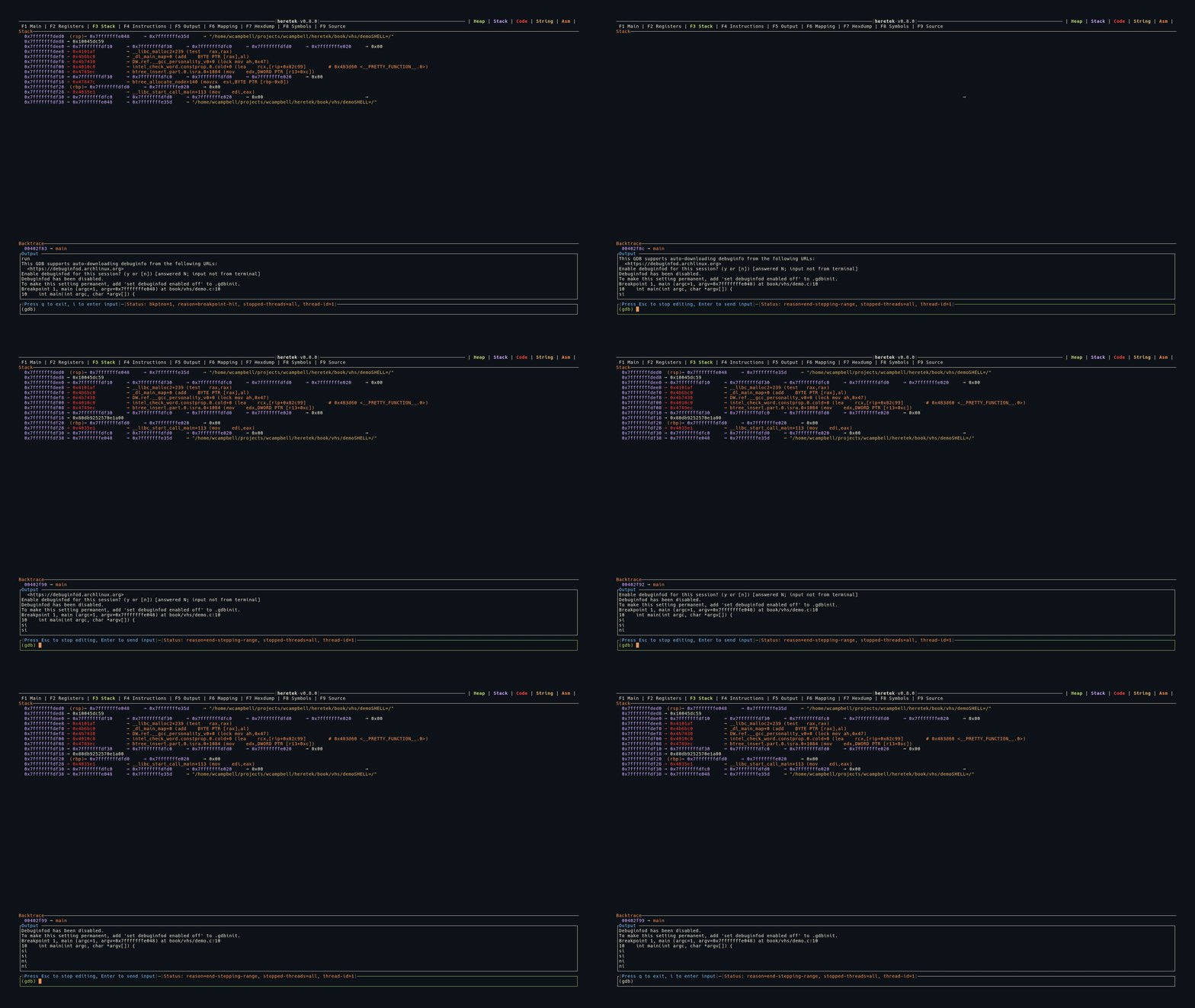
The Stack view shows the contents of memory starting from the current stack pointer ($sp).
Display
14 stack entries are displayed, each at ptr_size byte intervals from $sp:
0x7fffffffdfe0 (rsp)     0x0000000000000001
0x7fffffffdfe8           0x00007fffffffe1a8 → "/home/user/a.out"
0x7fffffffdff0 (rbp)     0x0000000000000000
- Addresses are shown in purple on the left
- Register annotations appear in orange when a register points to that stack address (e.g.,
(rsp),(rbp)) - Values are color-coded by memory region
- Each entry includes a full dereference chain, identical to the Registers view
Register Cross-Reference
The stack view cross-references all current register values against displayed stack addresses. If any register’s value matches a stack entry’s address, the register name is shown next to that entry. This makes it easy to see where rsp, rbp, and other registers point on the stack.
Instructions (F4)
The Instructions view shows disassembled code around the current program counter ($pc).
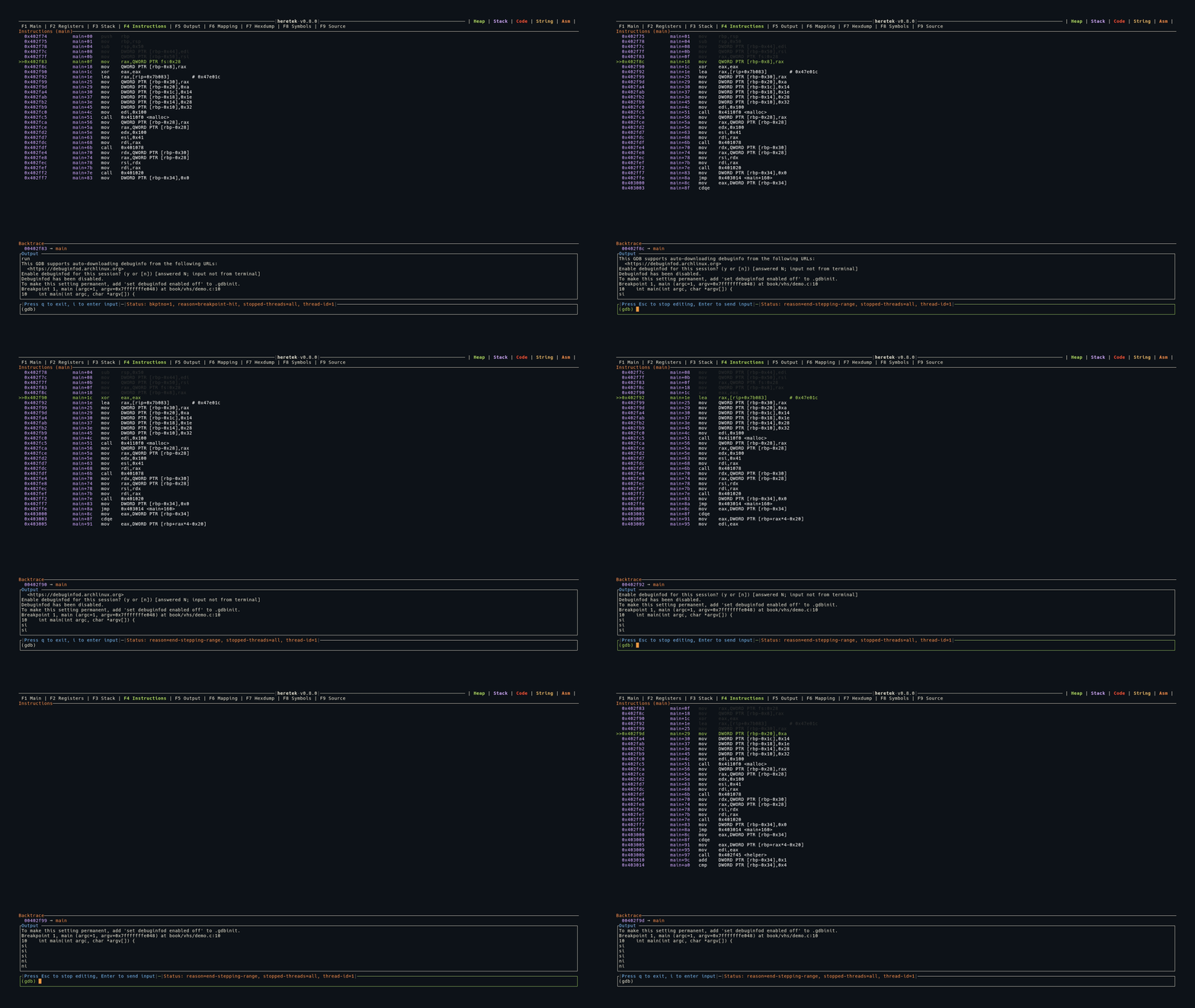
Display
Instructions are shown as a table with three columns:
  Address          Function+Offset    Instruction
  0x00401234       main+0             push   rbp
  0x00401235       main+1             mov    rbp, rsp
>>0x00401238       main+4             sub    rsp, 0x10     ← current $pc
  0x0040123c       main+8             mov    eax, 0x0
- The current instruction (
$pc) is highlighted in green with a>>marker - Instructions before
$pcare shown in white - Addresses and function+offset are shown in purple
- The panel title shows the current function name:
Instructions (main)
Disassembly Range
heretek disassembles a window around $pc:
- 5 instructions before
$pc - 10 instructions after
$pc
The view auto-scrolls to keep $pc visible.
Syntax
Intel syntax is used by default — heretek sends set disassembly-flavor intel to GDB when a program is run or attached.
Output (F5)
The Output view shows all GDB output and commands in a scrollable log.
Display
- Mini strip: In all non-Output views, the last 10 lines of output are shown in a strip at the bottom, always auto-scrolled to the latest output
- Full view (F5): The entire output history is shown in a scrollable, full-screen view
Content
The output panel shows:
- Commands you type, echoed back
- GDB stdout responses
- heretek messages, prefixed with
h>(e.g.,h> hexdump successfully written to /tmp/dump)
Some GDB output is filtered and not shown:
- Memory map parsing output
- Endianness detection messages
- Language detection messages
- Symbol list accumulation output
Keybindings
| Key | Action |
|---|---|
g | Jump to top |
G | Jump to bottom |
j | Scroll down 1 line |
k | Scroll up 1 line |
J | Scroll down 50 lines |
K | Scroll up 50 lines |
Hexdump (F7)
The Hexdump view provides a color-coded display of raw memory contents with register annotations.
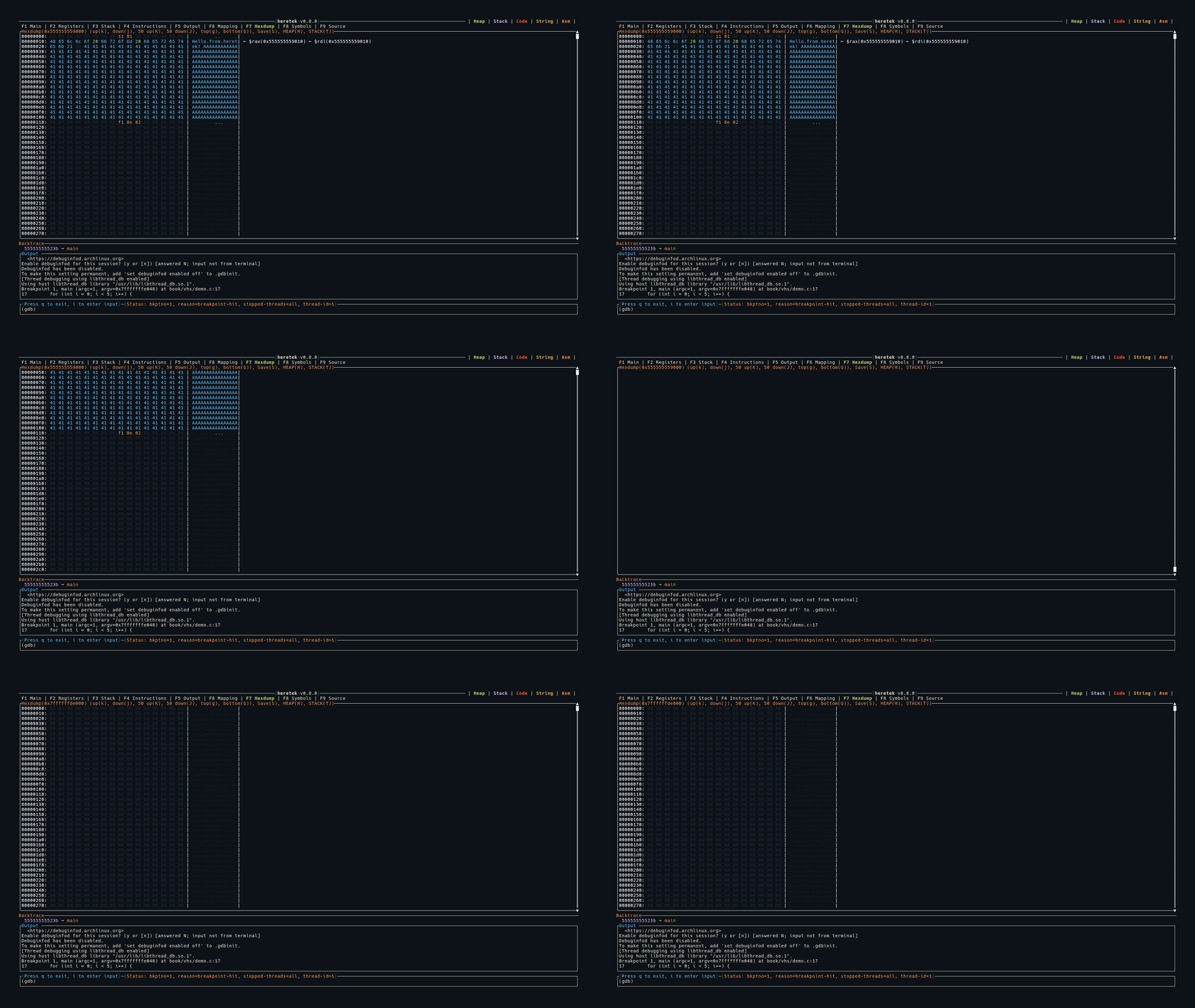
Display
Each row shows 16 bytes:
OFFSET: HH HH HH HH HH HH HH HH HH HH HH HH HH HH HH HH | ASCII.text.. | ← $rsp(0x7fffe000)
- Offset: Address of the first byte in the row
- Hex bytes: Each byte color-coded (see below)
- ASCII column: Printable characters shown as-is, non-printable shown as
. - Register annotations: If a register’s value matches an address in the row, it’s shown on the right as
← $regname(0xVALUE)
Byte Color Coding
| Color | Meaning |
|---|---|
| Dark gray | Null bytes (0x00) |
| Blue | Printable ASCII characters |
| Green | ASCII whitespace (space, tab, newline) |
| Orange | ASCII control characters |
| Yellow | Non-ASCII bytes (>= 0x80) |
Loading Data
There are several ways to load memory into the hexdump:
| Method | Description |
|---|---|
hexdump <addr> <len> | Dump arbitrary address and length |
H key (in Hexdump view) | Load the first heap mapping |
T key (in Hexdump view) | Load the first stack mapping |
H key (in Mapping view) | Load the selected mapping |
Address and length can be hex (0x...) or decimal. You can also use heretek variables:
hexdump $HERETEK_MAPPING_START_[heap] $HERETEK_MAPPING_LEN_[heap]
Saving to File
Press S to open the Save popup. Type a file path and press Enter to save the raw bytes to disk. ~/ expansion is supported.
Keybindings
| Key | Action |
|---|---|
g | Jump to top |
G | Jump to bottom |
j | Scroll down 1 row (16 bytes) |
k | Scroll up 1 row |
J | Scroll down 50 rows |
K | Scroll up 50 rows |
H | Load heap into hexdump |
T | Load stack into hexdump |
S | Save hexdump to file |
Memory Mapping (F6)
The Mapping view shows the current process memory mappings in a navigable table.
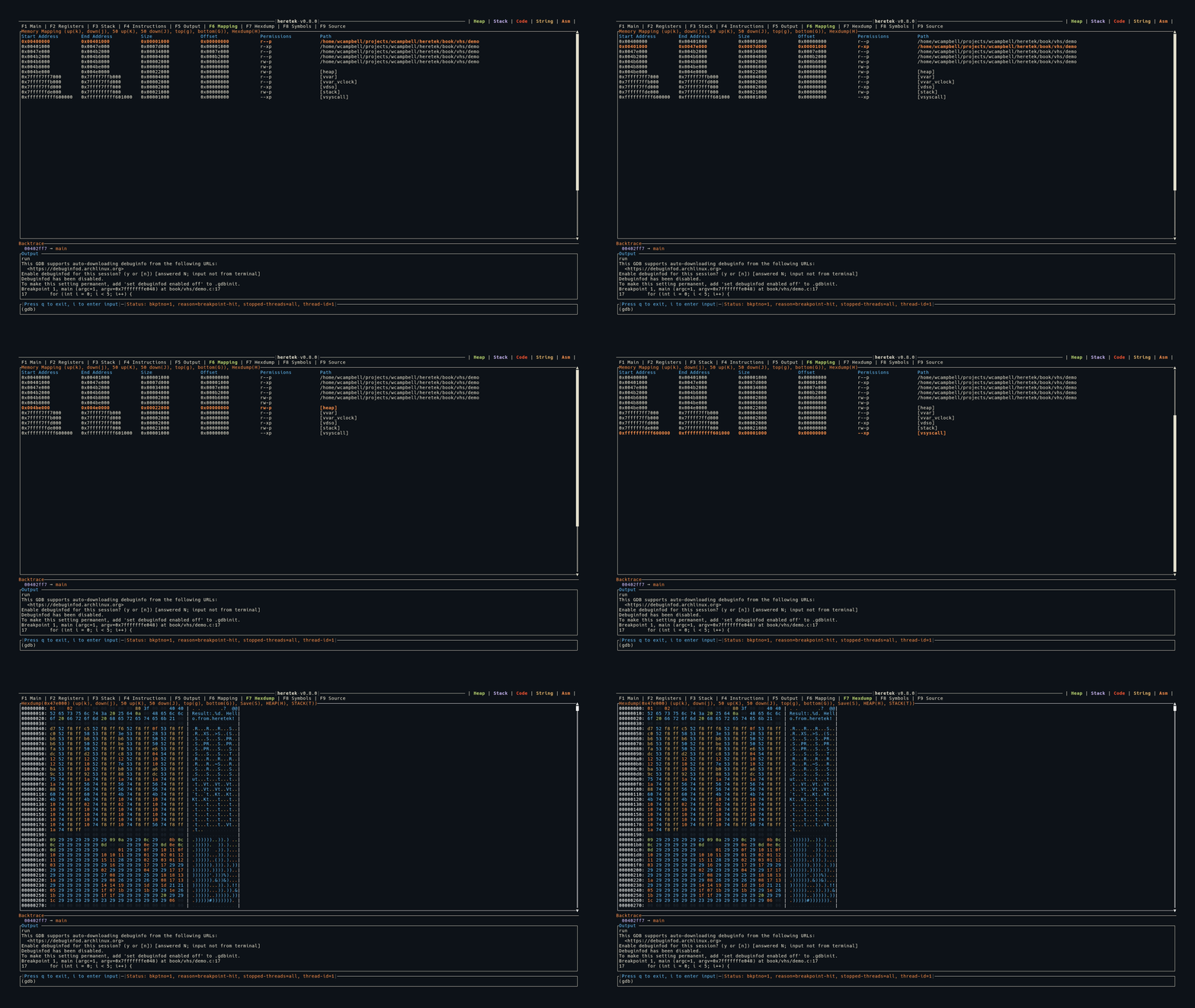
Display
Start Address        End Address          Size                 Offset               Permissions          Path
0x00400000           0x00401000           0x00001000           0x00000000           r--p                 a.out
0x00401000           0x00479000           0x00078000           0x00001000           r-xp                 a.out
0x00602000           0x00603000           0x00001000           0x00002000           rw-p                 a.out
0x01234000           0x01255000           0x00021000           0x00000000           rw-p                 [heap]
0x7ffff7dce000       0x7ffff7df0000       0x00022000           0x00000000           r--p                 libc.so.6
- The header row is shown in blue
- The selected row is highlighted in orange + bold
- A vertical scrollbar appears on the right
Region Classification
Mappings are classified for color coding across the application:
[stack]→ Stack (purple)[heap]→ Heap (green)- Executable permission or matching binary path → Code/text (red)
Hexdump Integration
Press H on any selected mapping to load its contents into the Hexdump view. This is a quick way to inspect any memory region.
GDB Compatibility
heretek supports both old and new GDB memory mapping formats:
- GDB ≤ 7.12:
Start Addr End Addr Size Offset objfile(no permissions column) - GDB ≥ 15.1:
Start Addr End Addr Size Offset Perms objfile
Keybindings
| Key | Action |
|---|---|
g | Jump to first entry |
G | Jump to last entry |
j | Move selection down 1 |
k | Move selection up 1 |
J | Move selection down 50 |
K | Move selection up 50 |
H | Open selected mapping in Hexdump view |
Symbols (F8)
The Symbols view provides a browsable list of all function symbols in the loaded binary, with fuzzy search and inline disassembly.
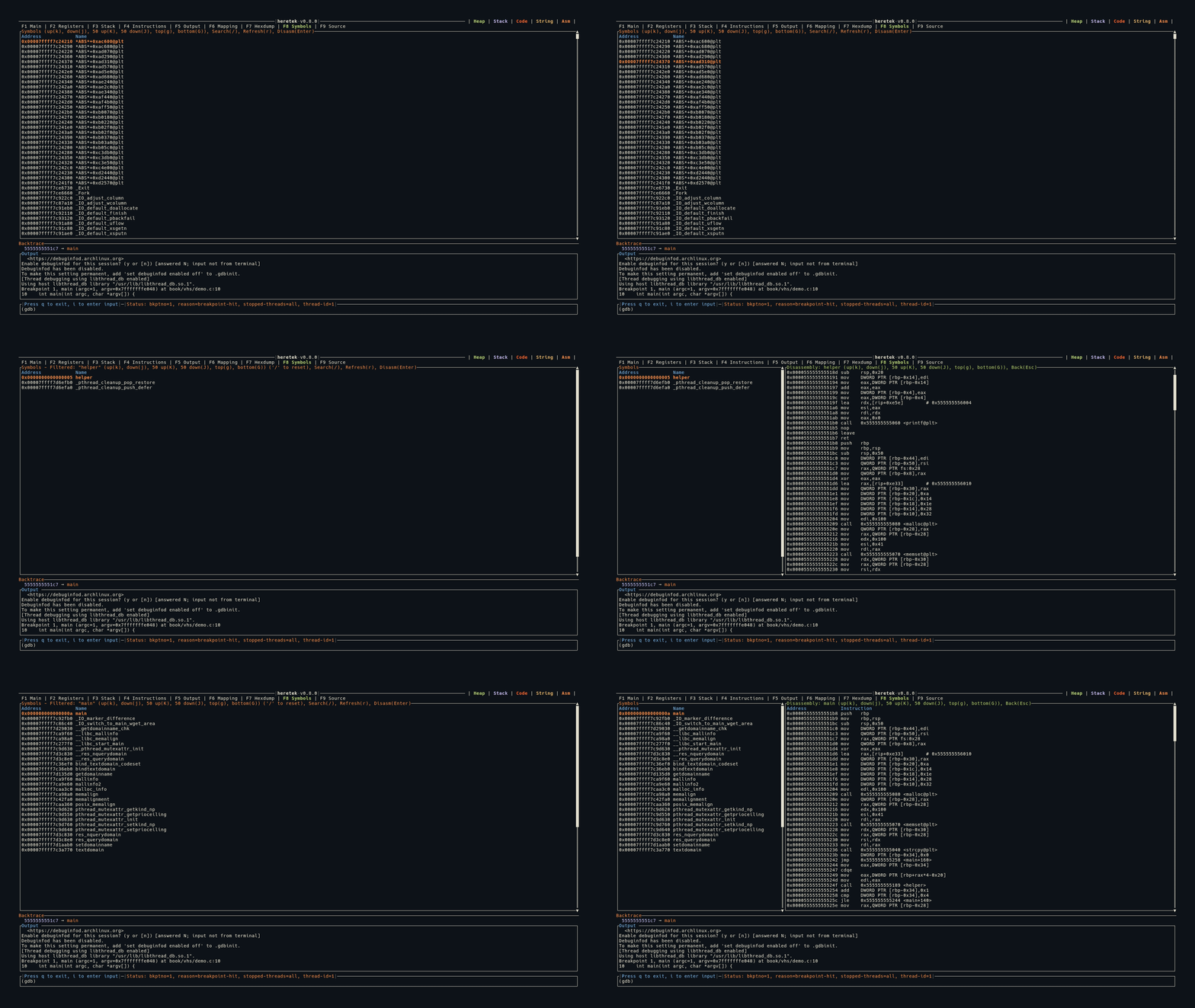
Symbol List
When you first switch to the Symbols tab, heretek runs info functions to populate the symbol list. Each symbol is shown with its address and name:
Address            Name
0x0000000000401000 _start
0x0000000000401030 main
0x0000000000401080 helper_function
- Header row in blue
- Selected row highlighted in orange + bold
- Vertical scrollbar on the right
Fuzzy Search
Press / to activate the search bar at the bottom of the panel.
- Search is fuzzy: all characters of your search term must appear in order in the symbol name, but don’t need to be consecutive
- Filter is applied live as you type
- Press
Enterto finish searching (filter stays active) - Press
Escto cancel the search - The title shows the active filter:
Symbols - Filtered: "main" - Press
/again to start a new search (clears the old filter)
Inline Disassembly
Press Enter on a selected symbol to disassemble it. The view splits into two panels:
┌──────────────────┬──────────────────────────────────┐
│  Symbol List     │  Disassembly: main               │
│  (30% width)     │  (70% width)                     │
│                  │                                  │
│ > main           │  0x401030  push   rbp            │
│   helper_func    │  0x401031  mov    rbp, rsp       │
│   _start         │  0x401034  sub    rsp, 0x10      │
│                  │  0x401038  mov    eax, 0x0        │
└──────────────────┴──────────────────────────────────┘
- The disassembly panel shows the function’s instructions (up to 500 bytes)
- Scroll keys (
j/k/J/K/g/G) control the disassembly panel when it’s open - Press
Escto close the disassembly and return to the symbol list
Refresh
Press r or R to re-run info functions and refresh the symbol list. Useful after loading new symbols or shared libraries.
Keybindings
| Key | Action |
|---|---|
g | Jump to top |
G | Jump to bottom |
j | Move selection / scroll down 1 |
k | Move selection / scroll up 1 |
J | Move down / scroll 50 |
K | Move up / scroll 50 |
/ | Activate fuzzy search |
Enter | Disassemble selected symbol |
Esc | Close disassembly / cancel search |
r / R | Refresh symbol list |
Source (F9)
The Source view shows syntax-highlighted source code for the current execution point, when source files are available.
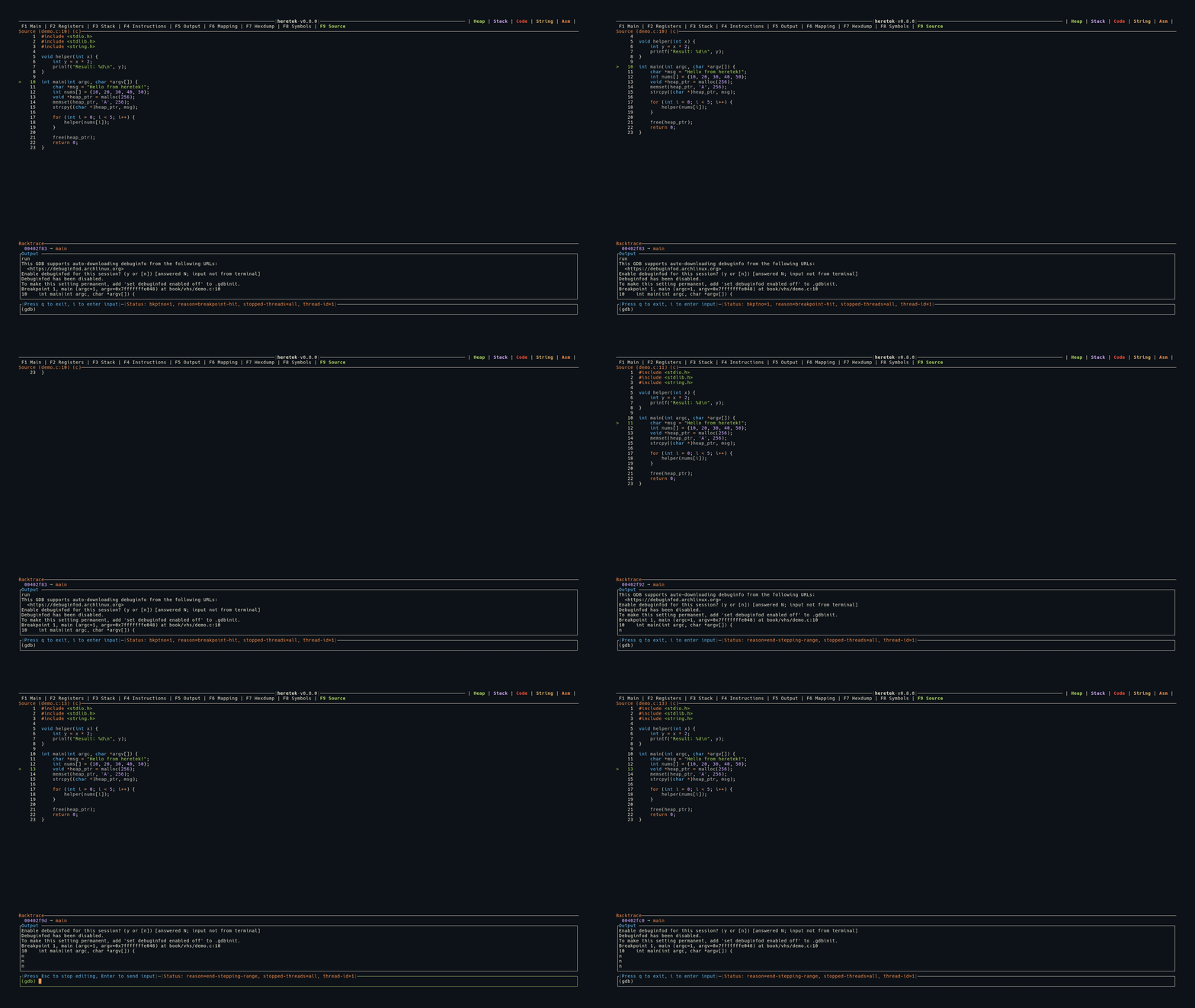
Display
  Source (main.c:42) (c)
     40│  int x = 10;
     41│  int y = 20;
  >  42│  int z = x + y;
     43│  printf("%d\n", z);
     44│  return 0;
- The panel title shows the filename, line number, and detected language:
Source (main.c:42) (c) - The current line is marked with
>in green - Line numbers are displayed in a left column
Syntax Highlighting
Source code is syntax-highlighted using treesitter (via the arborium crate) with the Ayu Dark theme.
Supported languages:
- C
- C++
- Rust
The language is auto-detected from GDB’s show language output.
Source Detection
Source file and line information comes from GDB stop events:
- The
fullnamefield (absolute path) from*stoppedMI records - Falls back to the
filefield iffullnameis not available - The actual file is read from disk — the source must be present on the local filesystem
In Main View
When source is available, the Source panel appears as the bottom section of the Main (F1) view, below Instructions. If no source is available, the Source panel is hidden.
Keybindings
| Key | Action |
|---|---|
g | Jump to top of file |
G | Jump to bottom of file |
j | Scroll down 1 line |
k | Scroll up 1 line |
J | Scroll down 50 lines |
K | Scroll up 50 lines |
Commands and Variables
heretek intercepts some commands and translates them to GDB MI commands. All other input is passed directly to GDB.
Intercepted Commands
These common GDB commands are intercepted and translated to their MI equivalents for proper async handling:
| You type | heretek sends | Notes |
|---|---|---|
r, run | -exec-run | Also sets mi-async on and Intel syntax |
c, continue | -exec-continue | |
si, stepi | -exec-step-instruction | |
ni, nexti | -exec-next-instruction | |
s, step | -exec-step | |
n, next | -exec-next | |
finish, fin | -exec-finish | |
until <loc> | passed through | Marks program as executing |
attach <pid> | passed through | Also sets Intel syntax |
file <path> | passed through | Extracts and saves filepath |
hexdump <addr> <len> | -data-read-memory-bytes | Switches to Hexdump view |
All other commands (e.g., break main, info registers, x/10x $rsp) are sent directly to GDB.
Arithmetic Expressions
Parenthesized expressions are evaluated before sending to GDB. This lets you do inline math:
hexdump $HERETEK_MAPPING_START_[heap] (0x1000 + 0x200)
The (0x1000 + 0x200) is evaluated to 0x1200 before the command is processed.
Variables
For all commands, the following heretek variables are resolved and expanded before sending to GDB.
$HERETEK_MAPPING_START_{index}_{section}
Resolve the start address of the mapping that fits section. The index is optional.
For example, $HERETEK_MAPPING_START_[heap] resolves the start of the heap mapping.
To pick a specific entry when multiple mappings match, use the index. For example, $HERETEK_MAPPING_START_1_a.out picks the second (1th) a.out mapping:
Start Address        End Address          Size                 Offset               Permissions          Path
0x00400000           0x00401000           0x00001000           0x00000000           r--p                 a.out
0x00401000           0x00479000           0x00078000           0x00001000           r-xp                 a.out
This would resolve to 0x00401000.
$HERETEK_MAPPING_END_{index}_{section}
Resolve the end address of the mapping that fits section at an optional index.
For example, $HERETEK_MAPPING_END_[heap].
$HERETEK_MAPPING_LEN_{index}_{section}
Resolve the length of the mapping that fits section at an optional index.
For example, $HERETEK_MAPPING_LEN_[heap].
Command History
- Up to 100 commands are stored in history
- Navigate with
Up/Downarrow keys - Press
Enteron an empty input to repeat the last command - Commands from
--cmdsfile are also added to history
Command File (-c)
Use the -c flag to execute commands from a file on startup:
$ heretek -c commands.txt
The file is read line by line. Lines starting with # are treated as comments and skipped. Each command is processed through the same pipeline as interactive input (variable expansion, expression evaluation, command interception).
Keybindings
Modes
heretek has two input modes:
- Normal mode — Navigation keys are active. This is the default.
- Editing mode — Keyboard input goes to the command line.
Press i to enter editing mode. Press Esc to return to normal mode.
Global Keys
These work in any mode:
| Key | Action |
|---|---|
Ctrl+C | Interrupt running program (sends -exec-interrupt) |
F1–F9 | Switch to corresponding tab |
Enter | Send command (editing) or repeat last command (normal) |
Up / Down | Navigate command history |
Tab (editing) | GDB tab completion |
Tab (normal) | Cycle to next tab |
Normal Mode
| Key | Action |
|---|---|
i | Enter editing mode |
q | Open quit confirmation |
Editing Mode
| Key | Action |
|---|---|
Esc | Return to normal mode |
Tab | GDB tab completion |
Enter | Send command to GDB |
Navigation Keys (Normal Mode)
These vim-style keys work across scrollable views:
| Key | Action |
|---|---|
j | Scroll / move down 1 |
k | Scroll / move up 1 |
J | Scroll / move down 50 |
K | Scroll / move up 50 |
g | Jump to top |
G | Jump to bottom |
Note:
gandGare available in Output, Mapping, Hexdump, Symbols, and Source views. Main and Register views only supportj/k/J/K.
View-Specific Keys
Memory Mapping (F6)
| Key | Action |
|---|---|
H | Open selected mapping in Hexdump |
Hexdump (F7)
| Key | Action |
|---|---|
H | Load heap into hexdump |
T | Load stack into hexdump |
S | Save hexdump bytes to file |
Symbols (F8)
| Key | Action |
|---|---|
/ | Activate fuzzy search |
Enter | Disassemble selected symbol |
Esc | Close disassembly / cancel search |
r / R | Refresh symbol list |
Command History
- Up to 100 commands are stored in history
Up/Downarrows navigate through previous commands- Pressing
Enterwith an empty input repeats the last command
Tab Completion
In editing mode, press Tab to trigger GDB tab completion:
- If one match: input is auto-completed
- If multiple matches: candidates are listed above the input box
Configuration
Environment Variables
RUST_LOG— Control log level. Use with--log-pathto write logs to a file.NO_COLOR— Disable TUI colors.
Color Coding
heretek uses the Ayu color theme throughout its interface. Colors have semantic meaning — they tell you what type of memory a value points to at a glance.
Memory Region Colors
| Color | Hex | Meaning |
|---|---|---|
| Green | #aad94c | Heap memory |
| Purple | #d2a6ff | Stack memory |
| Red | #ff3333 | Code / text segment |
| Yellow | #e6b450 | ASCII strings |
| Orange | #ff8f40 | Assembly instructions |
These colors appear in:
- Register values and dereference chains
- Stack entry values
- The color legend in the title bar
UI Element Colors
| Color | Used for |
|---|---|
Blue (#59c2ff) | Table headers, input field (editing mode), output panel title |
Purple (#d2a6ff) | Register names, stack addresses, instruction addresses |
Orange (#ff8f40) | Panel titles, register annotations on stack, selected rows |
Green (#aad94c) | Current instruction highlight, current source line, active tab |
Red (#ff3333) | Changed registers (values that changed since last stop) |
Yellow (#e6b450) | Popup titles (quit confirmation, hexdump save) |
Hexdump Byte Colors
The hexdump view uses a different color scheme for individual bytes:
| Color | Byte type |
|---|---|
| Dark gray | Null bytes (0x00) |
| Blue | Printable ASCII (graphic characters) |
| Green | ASCII whitespace (space, tab, newline) |
| Orange | ASCII control characters |
| Yellow | Non-ASCII bytes (>= 0x80) |
Disabling Colors
Set the NO_COLOR environment variable to disable all TUI colors:
$ NO_COLOR=1 heretek
Remote Targets
A key feature of heretek is the ability to connect to remote GDB sessions without requiring gdbserver. Many embedded and vendor-shipped environments have broken or missing gdbserver binaries — heretek works around this using only gdb, nc, cat, and mkfifo.
Setting Up the Remote Side
On the remote target, set up a pipe and start GDB listening over netcat:
$ mkfifo gdb_pipe
$ cat gdb_pipe | gdb --interpreter=mi | nc -l -p 12345 > gdb_pipe
This creates a bidirectional pipe between GDB’s MI interface and a network socket on port 12345.
Connecting from heretek
On your local machine, connect to the remote session:
$ heretek --remote <host>:<port>
For example:
$ heretek --remote 192.168.1.100:12345
heretek will connect to the remote GDB session and display the TUI dashboard as if it were a local session.
Development
All patches and merge requests are welcome!
Tooling
Rust
This project uses the Rust compiler. Follow instructions from Installing Rust.
Justfile
This project includes a justfile for ease of development. See Installing Just.
Building
$ just build
Testing
Testing requires gdb. Install from your package manager.
$ just test
Linting
$ just lint
See the justfile for more recipes.
Changelog
All notable changes to this project will be documented in this file.
The format is based on Keep a Changelog, and this project adheres to Semantic Versioning.
[Unreleased]
[0.8.0] - 2025-12-15
- Add
Sourceimprovements:- Add
Sourcedisplay page - Add
Sourcehighlight support for Rust, C, and C++ using arborium(treesitter).
- Add
- Send child process stderr to null
- Resolve info addresses with another symbol address lookup in
Symbolpage. - Poll slower when not expecting gdb response
[0.7.0] - 2025-11-14
- Hexdump memory mapping selection using
H#192 - Add symbol selection screen and asm printing #192
- Add quit confirmation #192
[0.6.0] - 2025-09-01
- Set disassembly-flavor to intel #164
- Auto detect arch ptr size #153
- Remove panic on empty memory mapping #149
- Nicely bail on errors #146
- Improve
--cmdshelp message #154 - Major code refactor #142
- Fixes for debugging riscv #175
- Display source when available #186
[0.5.1] - 2025-04-14
- Support reading memory map from gdb >= 16.2 #141
[0.5.0] - 2025-02-09
- Add
Tabcompletion to show possible completions and overwrite if singular #134 - Show
-stack-list-framesotherwise known asBacktracewhen available #129 - Add more documentation showing more usage of
heretekin Hexdump and Normal usage #128 - Try and deref the entire string when looking at a memory address #127
- Update depends
[0.4.0] - 2025-01-14
- Display registers that point to addresses in Hexdump #115
- Show asm and function offset in asm deref #117
- Expand
HERETEK_MAPPING_{START,END,LEN}to allow optional index of mapping #116 - Fix
HERETEK_MAPPING_{START,END,LEN}to allow all ascii chars as filename #116 - Add
--cmdsto cmd history #118 - Ignore
#comment lines in--cmds#119
[0.3.0] - 2025-01-09
- Adjusted size of UI elements in Main View #102
- Add
--gdb-pathto override gdb executed #101 - Show
Runningin status #106 - Allow
control+cto sendSIGINTto process #106- Always use
mi-async - Override
continueinto-exec-continue - Override
stepiinto-exec-step-instruction - Override
stepinto-exec-step
- Always use
- Change
--cmdinto--cmdsand from usinggdb> sourceto just running each line as a gdb cmd #106 - Add
--log-pathto control log location and remove writing toapp.logby default #108 - Change
RUST_LOGenv toinfoas default #108
[0.2.0] - 2025-01-02
- Remove
--localargument,hereteknow runs gdb locally by default #96 - hexdump: Resolve
~/in path for Saving #97 - hexdump: Speed up by only computing what is needed for display #98
- output/memory/hexdump: Add
Ghotkey to goto bottom #98
[0.1.0] - 2025-01-01
- Initial Release